Skip to content

Partnershop Campus

Frequently Asked Question

How can I change my service times?

A

How can I change my service times?

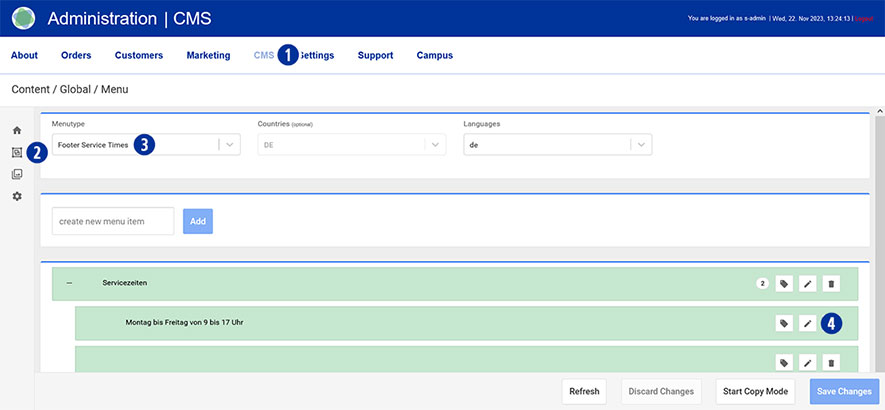
Switch to your Partnershop backend – CMS / Content / Global / Menu. [1][2]

Select in the left navigation Menutype / Footer Service Times. [3]

Under “Service times” click on the “Edit” icon [4].
Change your entries. [5]

Save your changes using the “Save Changes” button. [6]

Category: CMS
Tag: USSP24
Back to Top
  • English
    • Français
    • Deutsch
    • Italiano
    • Español

Categories

  • CMS (19)
  • Finance (26)
  • General (19)
  • Marketing (24)
  • Production (22)
  • Settings (3)

Tags

  • backend
  • Bundle
  • Chatbot
  • Combined shipment
  • Credit
  • Credit card
  • Customer Communication
  • Customer credit
  • Customer invoice
  • Discount
  • Discount code
  • DNS
  • Facebook Ads
  • first steps
  • General
  • Google Adwords
  • Google Site Verification
  • Google Tag Manager
  • Internal Order
  • Invoice
  • Invoice Template
  • KI-Support
  • MailChimp
  • Maintenance
  • Marketing material
  • Newsletter
  • Offline-Payment
  • order status
  • PayPal mandate
  • Place of Production
  • print credit
  • print data
  • Product graphics
  • Provider
  • robots.txt
  • Saferpay
  • sales overview
  • Screenproof
  • SEO
  • Sitemap
  • Six Payment
  • Trustpilot
  • USSP24
  • Voucher
  • Zero
Partnershop Campus Proudly powered by WordPress