Orders received in the Partnershop go through different statuses, which are displayed in the Partnershop backend.
Under Order > Track > Detail view in the module Order number [1], the current order status can be viewed in the field State of Order [2]. The status update is automatically done in the background.
The module State-History [3] chronologically lists the completed order statuses for an order.
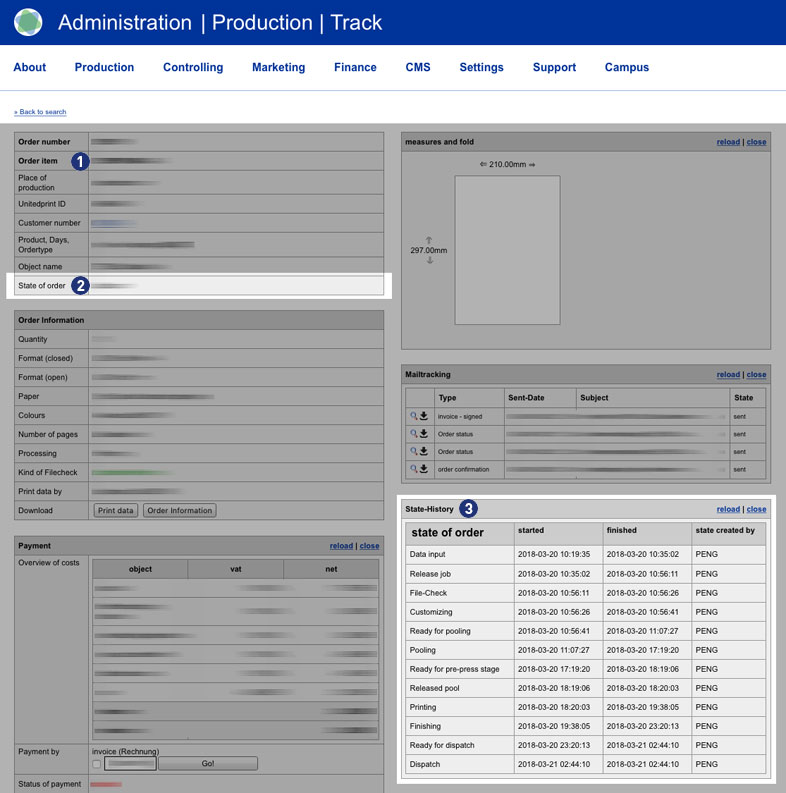
The order status of an order can provide information if an order from the Partnershop can not be transferred to Unitedprint.
Status: Data Input
Data upload – Print data not uploaded
Payment in advance – receipt of payment not confirmed
Payment – Online Payment has not set Clearance
Status: Waiting for Customize-Release
Data upload – Missing new print data after data check
Status: Waiting for Proof-Release
Release – Proof approval of partner shop customer is pending
The following statuses can be displayed for an order.
| Status | Beschreibung |
| Data input ¹ | Data input |
| Release job ² | Release job |
| File-Check | File-Check |
| Waiting for Customize-Release | Waiting for Customize-Release |
| Customizing | Customizing |
| Waiting for Proof-Release | Waiting for Proof-Release |
| Ready for pooling | Ready for pooling |
| Pooling | Pooling |
| Ready for pre-press stage | Ready for pre-press stage |
| Printing | Printing |
| Self-Production | Self-Production |
| Finishing | Finishing |
| Ready for dispatch | Ready for dispatch |
| Dispatch | Dispatch |
| Cancellation | Cancellation |
Notes
¹ If the payment status “Payment in advance” has been confirmed, the print data has been uploaded but the order status “Data input” is still displayed after approx. 15 minutes, please contact the support.
² If the order status “Release Job” is still displayed after approx. 15 minutes, there is usually a payment problem between you as the Partnershop owner and print24. Please contact the support.