Would you like to log in to your partner shop and realise that it is not possible to log in despite entering the correct user data?
Or would you like to add a product to your shopping basket and instead you keep being redirected to the homepage of your Partnershop?
In such a case, it may be necessary for you to manually delete the shopping basket of your Partnershop.
To do this, switch to your Partnershop backend – Customers. [1]
Search for your customer number, name, e-mail address, etc. [2]
The desired customer profile is displayed as a result. [3]
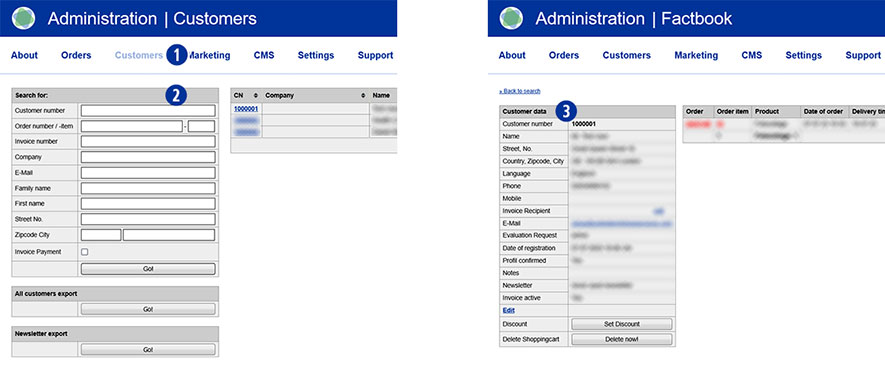
In the ‘Customer data’ module, you will find the ‘Delete shopping cart’ line at the end. [4]
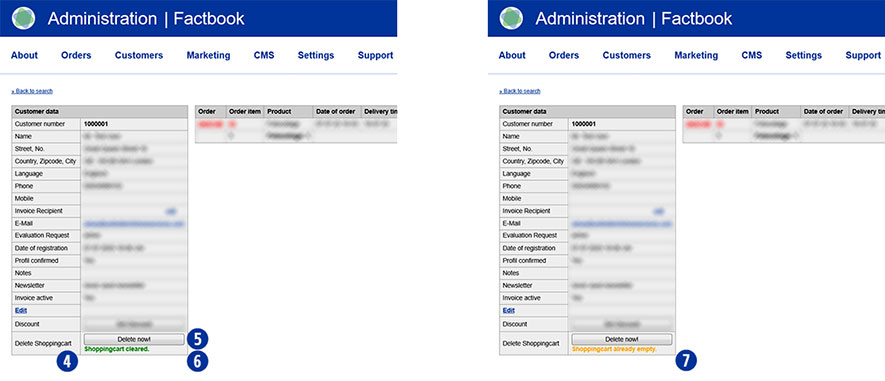
Click the ‘Delete now!’ button. [5]
The message ‘Shopingcart cleared.’ appears. (highlighted in green). [6]
Then go back to the homepage of your Partnershop and place an order.
Log in with your login data. The shopping basket has been emptied in the background.
Now continue with your order.
Note
Depending on whether and when you were last logged in with the selected user, the message ‘Shopingcart already empty’ appears after clicking on the ‘Delete now!’ button. This means that there is no saved shopping basket data for this user. [7]