Yes. As a Partnershop operator, you have the option of having copies of certain customer emails sent to you automatically.
This allows them to keep track of communication and ensure that all relevant information is documented.
The prerequisite for this is that you provide a valid email address for this communication.
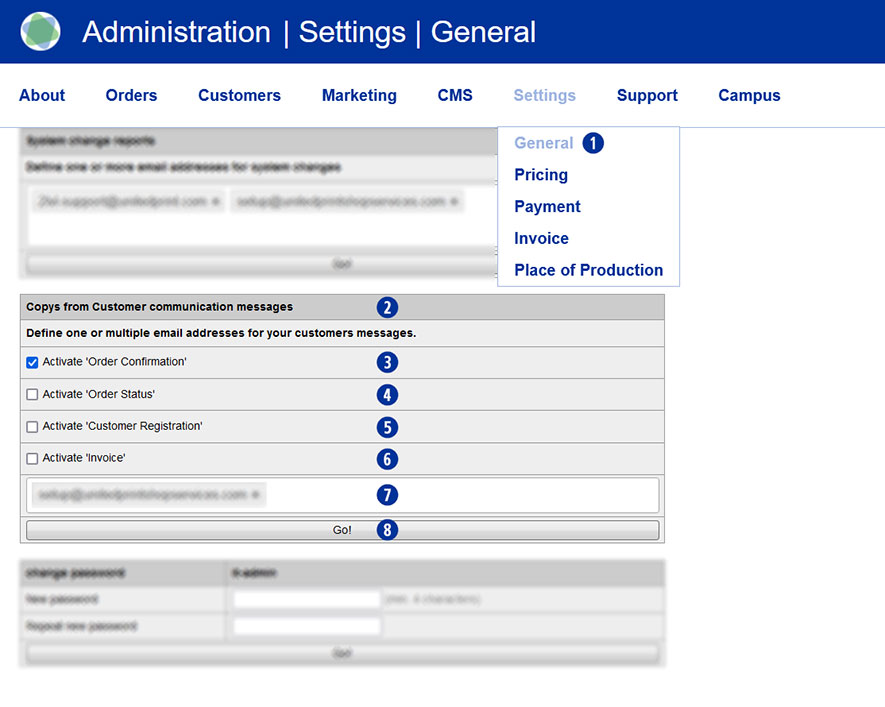
Go to the Settings / General menu in the Partnershop backend. [1]
Using the “Copies from Customer Communication” [2] module, you can specify which emails to your customers you would like to receive copies of.
Order confirmation [3]
You will receive a copy of the order confirmation for every customer order placed through your partner shop. At the same time, you will receive a second email from print24 to you as a partner. The email will be sent within approx. 30 minutes.
Change of order status [4]
You will be informed about the change in the order status in a copy of the following order processing progress: data receipt confirmation, data control confirmation, printing and further processing status and shipping confirmation.
Customer registration [5]
You will automatically be notified in copy by email as soon as a customer has registered in your Partnershop.
After receiving the notification, you can check the new user account via the backend.
Invoice dispatch [6]
After the order has been dispatched, the customer will be invoiced. You will automatically receive a copy via email when the invoice is sent.
Select one or more options (checkboxes) to automatically receive a copy of these customer emails. [3][4][5][6]
Then enter a valid email address. [7]
Confirm your entries by clicking on the “Go!” button. [8th]
From this point on, you will automatically receive a copy of the customer emails for the options you selected to the email address you previously provided.
Notice
When entering the email address, it is also possible to store several different email addresses.