Yes, the ‘Invoice’ payment method can be activated for individual customers.
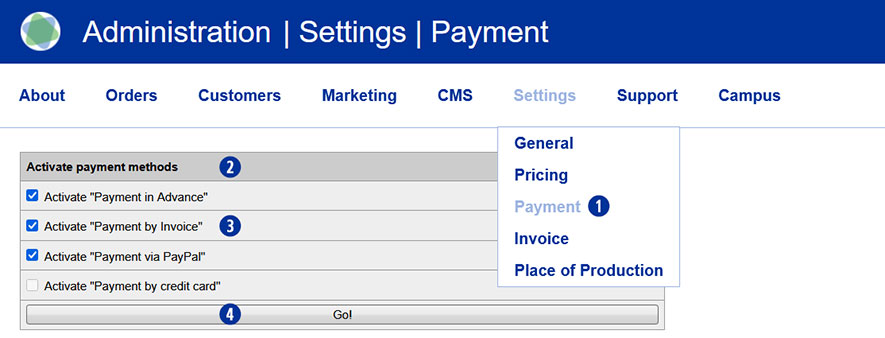
Go to the Partnershop backend – Settings / Payment. [1]
Navigate to the ‘Activate payment methods’ module. [2]
Activate the “Payment by Invoice” checkbox. [3]
Save the change using the ‘Go!’ button. [4]
Then switch to the Partnershop backend – Customers. [5]
Navigate to the ‘Search for’ module [6] and search for the customer for whom you would like to authorise invoice payment. Use one or more of the search criteria, such as customer number, e-mail address, name, etc., to do this. [7]
Confirm the search by clicking on the ‘Go!’ button [8]
If you know the customer number, you can select it directly from the overview on the right under ‘CN’ by clicking on the number. [9]
This will open the corresponding customer data record.

For further editing, click on the ‘Edit’ link in the ‘Customer data’ module. [10] [11]
In the ‘Edit customer data’ module [12], all possible payment methods are displayed – regardless of the options activated under. [2] [13]
To activate the ‘Invoice’ payment method for the previously selected customer, tick the “Invoice” [14] checkbox in the ‘Payment methods’ area as a permitted payment method.
Save the change using the ‘Save’ button. [15]

Note
The ‘Invoice’ checkbox in the ‘Edit customer data / Payment methods’ module is deactivated by default and must be activated for each customer if required.