If an order was placed by your customer with the payment method “Advance payment”, you must confirm receipt of payment.
To do this, proceed as follows.
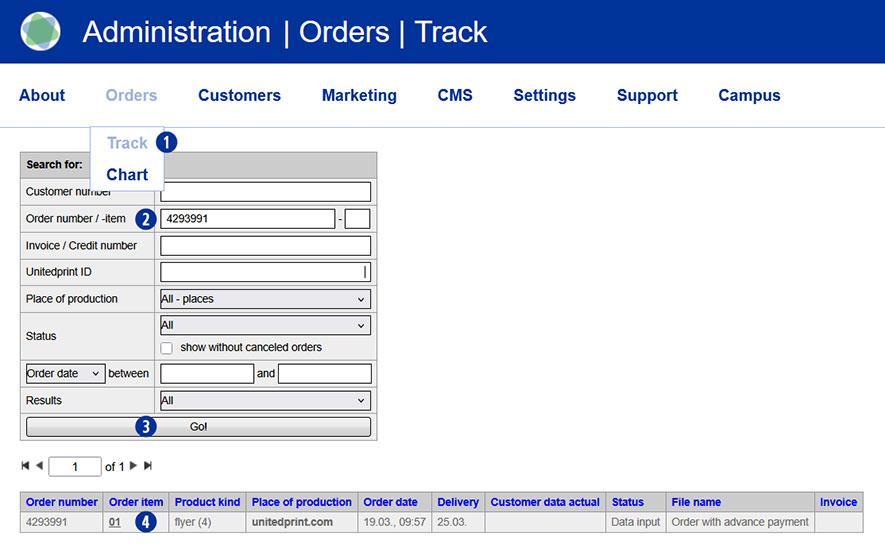
Switch to the Partnershop backend – Orders / Track menu. [1]
To find a desired order, use the possible search options, such as “Order number” or “Order date”. [2]
Confirm your entry by clicking on the “Go!” button. [3]
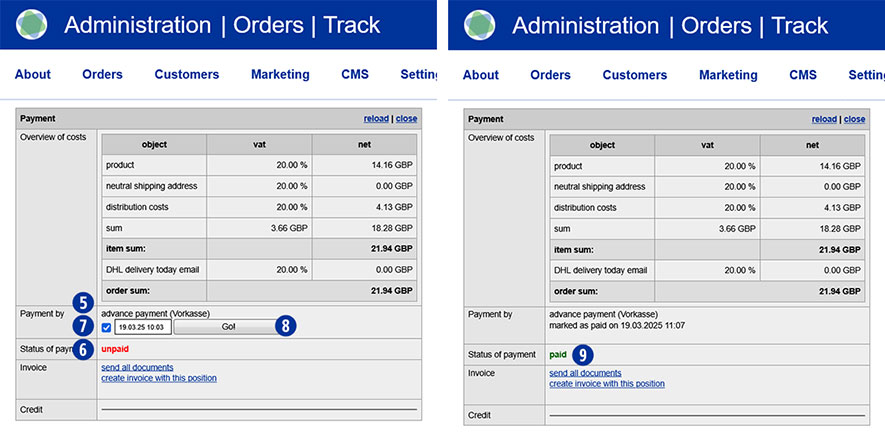
Navigate to the “Payment” module. [5]
In the “Status of payment” line, the current order status is displayed as “unpaid”. [6]
Activate the “Advance payment” checkbox by clicking in the “Payment by” line. [7]
Confirm the activation by clicking on the “Go!” button. [8]
In the “Status of payment” line, the order is displayed as “paid” and is therefore released for production. [9]
Note
Only after the status has been changed from “unpaid” to “paid” will a prepayment order be automatically transmitted to Unitedprint.
If a PayPal payment is displayed as “unpaid”, please check the payment transactions in your PayPal business account.
If the payment has been received, confirm receipt of payment there.
If no payment has been received, please inform your customer.
Unconfirmed PayPal payments for partner shop orders will not be transmitted to Unitedprint and therefore will not be produced.