With the sales overview, you can keep track of your Partnershop income and expenses at all times.
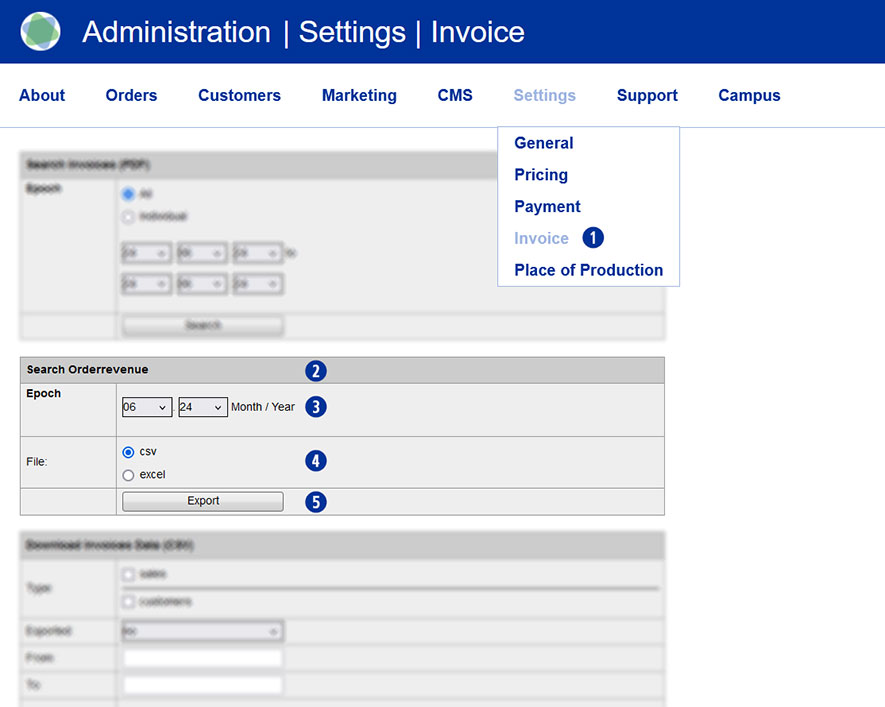
Switch to the Settings / Invoice menu in the Partnershop backend. [1]
Under the module “Order revenue” [2], you specify which actions you want to be notified about by email.
For a query, select the desired period (month/year) [3], the desired file format (Excel or CSV) [4] and then click the button “Export” . [5]
The export file is either opened directly or saved locally with the appropriate name.
Example
Show all sales of my customers in the month June 2024
- shopbrandname_revenues_2024_06.xls
- shopbrandname_revenues_2024_06.csv
The generated report contains the following columns/values including a heading.
- Unitedprint Invoice ID
- Unitedprint Invoice Date
- Unitedprint Orderrevenue
- Unitedprint Order ID
- Unitedprint Paymethode
- Shop Invoice ID
- Shop Order ID
- Shop Orderrevenue
- Shop Paymethode
Category:
Settings