It is possible to use the implemented AI assistant (chatbot) to process customer enquiries.
Take advantage of the AI assistant to respond to customer enquiries quickly and efficiently, regardless of time and resources.
Instead of making personal contact by dialling a service telephone number, you can receive support requests via the AI assistant. They receive these enquiries in the form of an email with all the information provided by the customer.
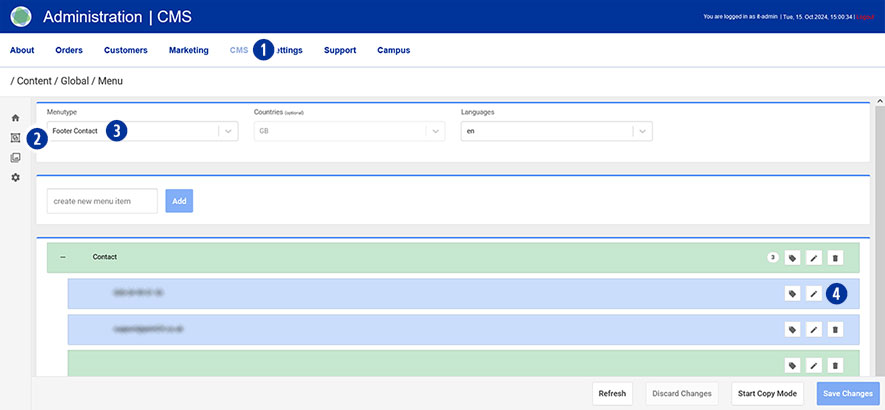
To do this, go to your Partnershop backend – CMS / Content / Global / Menu. [1][2]
Select Menutype / Footer Contact in the left navigation. [3]
Select the first menu item under ‘Contact’ and click on the ‘Edit’ icon [4].
Change your entries.
Under ‘Text Type’, change the radio button from ‘contact’ to ‘text’. [5]
Enter your content in the ‘Text’ input field (e.g. Callback requested?). [6]
Next, under ‘Link Type’, change the radio button from ‘contact link’ to ‘redirect to chatbot’. [7]
Select the ‘Send Message Callback’ option in the ‘Chatbot Function’ navigation on the right. [8]
Save your changes using the ‘Save Changes’ button. [9]

Publish changes
After saving, the changes must be published.
Switch to your Partnershop backend – CMS / Administration / Redis Management / Exports.
Click the ‘Create Productive Version’ button.
Your changes will be visible to all customers in the shop after approx. 2 minutes.