Marketing (3)
So you have collected a larger number of business contacts over the time and you wonder what to do with these contact details in order to promote your online print shop? No matter if these contacts are existing client or merely prospective buyers: Contact information is a valuable asset that you should use in order to meet your communication targets (such as the establishment of a local brand or the promotion of your portfolio). In today’s widely digitalized world to send out personalized content to a large number of recipients with just a few clicks, saving you time and money – if you do it all right. The most popular mass communication channel is e-mail Marketing. Software solutions manage your contacts and all they need is your contacts’ names and e-mail addresses. The convenience of this channel allows you to put more effort into the preparation of content (and of course into other Sales/Marketing activities).
In case you lack ideas of when and what to write to your contacts, we would like to provide a little inspiration you with a potential year-round-calendar of potential newsletters.
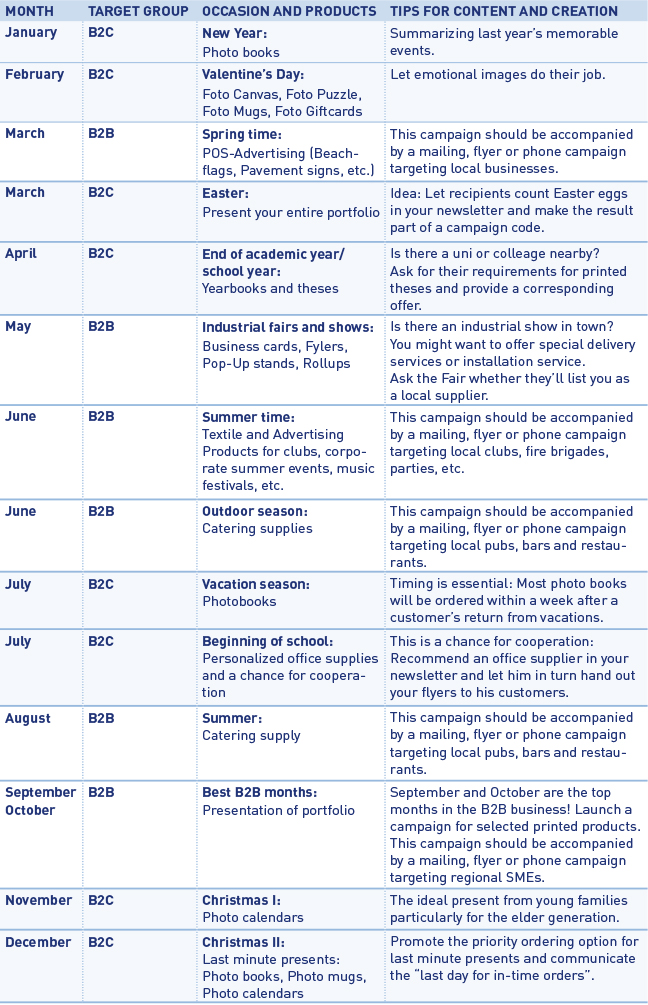
In addition to such seasonal newsletters, you might want to add special campaigns, e.g. for customers who haven’t ordered for a while (you would select/group these contacts in your newsletter management tool) and are now offered a special discount for returning customers.
No matter what the occasion and the actual content of your newsletter are, you should make sure the recipients of your newsletter become readers. The first thing (and unfortunately rather often the only thing) your audience will see of your newsletter is its subject. Hence, this subject should be as attractive as possible so that the newsletter will not be ignored/deleted immediately. Our advice is to for instance mention your town’s/region’s name and maybe a promised benefit in the newsletter’s subject line (e.g. “Birmingham bar owners now safe 10% on catering supplies”). Apart from price campaigns you might also want to mention your businesses’ special services or print shop’s special features. When creating the actual newsletter, put more effort in an attractive image and write as little text as possible. You don’t want to “waste” your target group’s time but make them visit your web shop as soon as possible. For this reason we advice to integrate a “call to-action” button into your e-mail.
For setting up and realizing your newsletter campaigns we recommend the software tool MailChimp (https://mailchimp.com), which is free of charge for campaigns with less than 5.000 recipients. In addition we recommend tracking your newsletter’s success (conversion rate) by using Google Analytics.
The “MailChimp” tool is a sophisticated newsletter editor offering a wide range of components.
For example, even the free version enables you to send up to 12,000 emails a month to 2,000 recipients (with a small advertising banner).
MailChimp provides a number of templates which, thanks to a “responsive design” also display correctly on mobile end devices.
The instructions below contain further details on using the newsletter tool, and the most important steps to follow for your newsletter campaign.
Note
For your domain to support the required authentication procedures DomainKeys Identified Mail (DKIM) and Sender Policy Framework (SPF), two additional DNS records are required.
To configure your domain for DKIM, add an entry with the following settings:
Type: CNAME
Prefix: k1._domainkey
Value: dkim.mcsv.net
Now add another entry for SPF with the following settings:
Type: TXT
Value: v = spf1 include: servers.mcsv.net? All
Your customers can subscribe to a newsletter list via the button “Newsletter” in the footer of your Partnershop. The collected data are stored in a list as a CSV file and can via the backend under “Marketing – Customers – Newsletter export” retrieved.
Note
The Partnershop system does not include a functionality newsletter tool!
The generation and delivery of a newsletter can be done individually through a separate newsletter software. For this you can import the previously exported list (CSV file) from the Partner Store in your newsletter software.
The administration of subscribe and unsubscribe to the newsletter is performed through the separate newsletter software and is not a function of the Partnershop.