The Facebook Pixel is an analysis tool that you can use to measure the effectiveness of your advertising. In the Ads Manager of Facebook you can see which ads generated which sales.
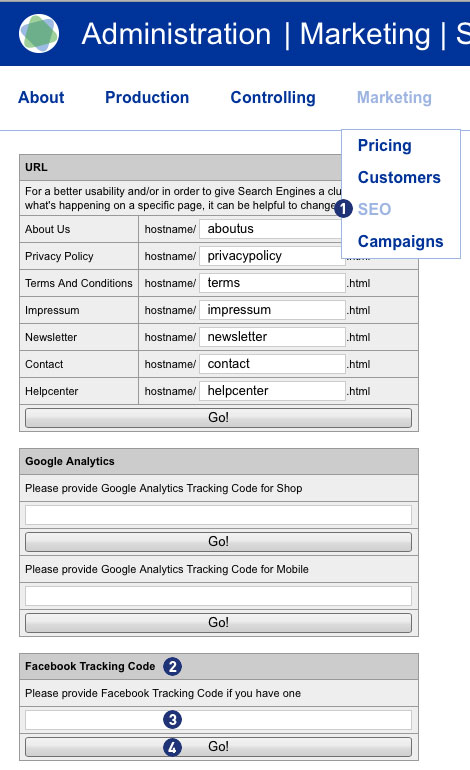
Entering or saving the Facebook Tracking ID (Facebook Pixel) is done via the Partnershop backend Marketing > SEO [1] in the module “Facebook Tracking Code”. [2] In the provided input field [3] enter your Facebook Tracking ID. Save the entry via the button “Go!”. [4]
Note
You will receive the Facebook Tracking ID if you create a business account with your Facebook page and create an ad account.
Create the Facebook pixel
- Go to the “Pixel” tab in Ad Manager.
- Click on “Create Pixel”.
- Enter a name for your pixel. You can only create one pixel per ad account. So choose a name that represents your company (Partnershop).
- Check the box to accept the terms of use.
- Click “Create Pixel”.
After you have set up the Facebook Pixel, you can start showing ads on Facebook with conversion optimization and tracking.
For detailed information how to set up a Facebook Business Account, including how to create a Facebook Pixel, you find in this step-by-step guide.