The potential of a USS partner shop

What is the potential of my own USS partner shop?
The turnover of your partner shop will increase steadily over the months and years, as long as you put time, energy and – yes – some money into your Marketing. Based on a couple of assumptions, we should be able to lay out a realistic scenario for your business years 1-3.

Customer distribution Year 1
The average order value of a business customer is around £ 60 (net). With a partner markup of around 25%, you will see an average order value of around £ 75 (net).
4 A customers (order 1x per week) = ca. £ 15,000
10 B customers (order 1x per month) = ca. £ 9,000
40 C customers (order 1x in 6 months) = ca. £ 6,000
Turnover Year 1: In this scenario, your partner shop has a potential of 1,5 order per day and £ 30,000 annual turnover in Year 1.

Customer distribution Year 2
12 A customers (order 1x per week) = ca. £ 46,000
30 B customers (order 1x per month) = ca. £ 27,000
100 C customers (order 1x in 6 months) = ca. £ 15,000
Turnover Year 2: In this scenario, your partner shop has a potential of 4 order per day and £ 120,000 annual turnover in Year 2.

Customer distribution Year 3
25 A customers (order 1x per week) = ca. £ 98,000
60 B customers (order 1x per month) = ca. £ 55,000
280 C customers (order 1x in 6 months) = ca. £ 42,000
Turnover Year 3: In this scenario, your partner shop has a potential of 9 order per day and £ 260,000 annual turnover in Year 3.

What’s my earning potential?

You earnings as a USS partner basically depends on two variables: Your turnover and the individual markup that you had defined in you backend. However, please note that there is a correlation between these two variables: The smaller your markup, the better your webshop’s price-competitiveness and the higher your turnover. So, better think twice when defining your markups.

Markups
To create sales prices that are still price-competitive, we advise you to define markups between 5-25%. Markups higher than 25% will make your partner shop seem expensive.

Potential
Coming back to the example we already used to take a look at a USS partner shop’s turnover potential, we see that the partner had defined a 25% markup. With a £ 195,000 (net) Year 3 turnover, the partner generates earnings of £ 49,000 (net).

A Marketing plan for your first 100 days

You now own a USS partner shop but you don’t know exactly how to realize your turnover potentials? Follow our 100-day-marketing-plan and you will soon see first successes.

1. Preparations

  • First complete the settings in your partner shop. There are 5 little tasks you need to do. You find them here.
  • Visit one of our free webinars (most importantly a basic course, will be announced by a newsletter)
  • Complete a test order to get familiar with the ordering processes
  • Conduct a brief market research before you define your price markups (what is your local price level and what surcharge can you justify?)
  • Make sure your shop will be found by search engines
  • Set up social media pages (e.g. Facebook)

2. Inform your network

  • Newsletter/Mailing/Mail stickers: Inform your existing network about your new shop.
  • Newsletters: Write newsletters to your contacts/subscribers (btw: some professional tools can be used for free, e.g. MailChimp)
  • Mailing:Send out a mailing with a personalized cover letter as well as envelopes and advertising flyers in your corporate design.
  • Mail stickers: Stick your news onto your postal letters.
  • Email footer: Use your Email correspondence to inform about your new web shop, by adding a banner to your Email footer
  • Banner on websites: Integrate a banner on your regular website (if available) and your social media accounts, which redirects visitors to your web shop and turns them into customers

3. Acquire customers personally

Find customers with a particularly high potential within your target group and talk to them face to face (e.g. small / medium enterprises, large sports clubs).

4. Welcome offers

Offer “goodies” to customers that place their initial order (e.g. a free shirt or a free set of business cards). Or reduce the price for a particular product and promote it.

Inform your visitors about your promotions / offers, e.g. by sending out a newsletter, posting it on social media, or using your slideshow images. Inform your high-potential customers in a personal correspondence.

5. Advertise locally / regionally

It’s time to create a local/regional brand! Here are some Marketing ideas:

  • Place print advertisement in local magazines / newspapers
  • Put up banners at local events
  • Place flyers at local retailers
  • Sponsor a local youth sports team
  • Hand out customer give-aways at local events
  • Create a network with local businesses and clubs (z.B. Approach your local chamber of commerce, try to organize a network breakfast)

6. Increase your audience

A large pool of newsletter subscribers and followers/fans on social media channels is the basis of future successes in communication!

Therefore, you could offer a £ 5 discount code for new newsletter subscribers. The same goes for your social media presences: Why not offer that same code to every new “fan” of your page.

7. Advertisement by topic

Besides having a local/regional niche, you might develop an additional focus – not on a certain geographical region but a certain topic. You might for example realize that you have created yourself a decent network with specific sports clubs. So why not intensify your Marketing efforts here and focus on that niche?

The right target group

What are the target groups of other USS partners?

USS partner normally focus on their local/regional market when selecting their target group, rather than engage in national marketing. Their target groups normally consist of:

  • Present or former customers (of prior business connections)
  • All known or perceived customers of competitors
  • The 2.500 largest firms in a 15 mile area
  • All advertising and event agencies in a 15 mile area
  • All organizations (Red Cross, etc.) in a 15 mile area
  • All clubs/societies/associations (e.g. sports, social, charitable) in a 15 mile area
  • All administrative institutions (administrative offices, unions, town/city/county governments and their single departments) in a 15 mile area
  • All restaurants/cafés in a 15 mile area
  • All schools/universities in a 15 mile area

Google My Business

Are you looking for an effective way to promote your USS Partner Shop as a local company free of charge and online? With Google My Business you can use a popular service of the world’s leading search engine, allowing you to increase your visibility in local online searches. Google My Business differs greatly from other online advertising methods such as paid search engine advertising (SEA), since it’s free of charge and provides consistency. While Google AdWords asks for defined budgeted limits and campaign periods, Google My Business merely creates a profile with static information (e.g. your company’s name). As a result, the marketing effect of a Google My Business registration is permanent, while other online marketing channels have an effect limited to a campaign period.
As a local business, you shouldn’t disregard the importance of online visibility: 18% of all smartphone users will make a purchase in the local shop on the same day they looked up a service in a local search query.

GoogleMyBusiness01_deGoogle My Business is connected to other Google services, such as Google Maps, which turns it into a kind of central control platform for your visibility. Based on your company’s focus, its geographical business sphere, brand name, and other indicators related to Google My Business and other Google services, your business appears within the local search result lists.
Now let’s look at the steps you have to follow in order to set up a Google My Business Account for your USS Partner Shop.


Getting started

Firstly you need to register on www.google.de/mybusiness. [1]GoogleMyBusiness2_de
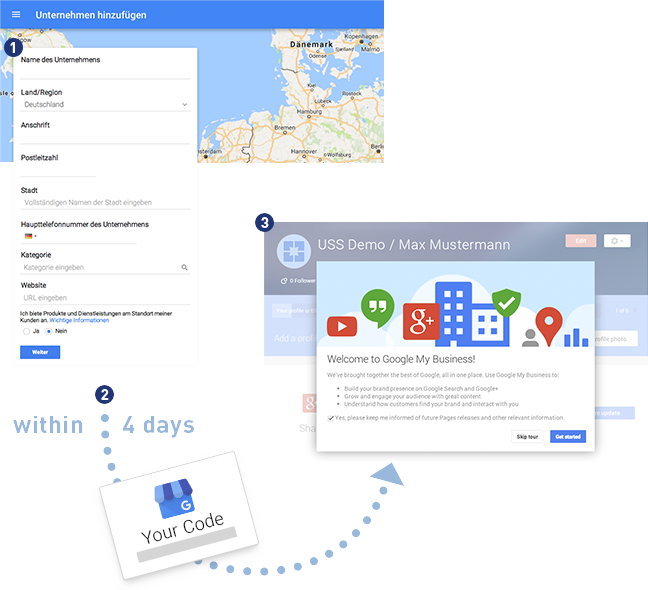
  • Enter your company’s address
  • If your company already exists on Google My Business, it might have already been created e.g. by an employee of your company. In this case, try to get hold of the access data (Google guides you trough that process). If the company does not yet appear as a suggestion, just fill in the remaining form fields and register it.
  • When defining the company name, it might be a good idea to add a brief description of what you do, e. g.: „Print Shop London – ‚Actual Company Name‘“
  • You now need to add general information of your local business. This includes the country, address, postal code and city as well as your website’s URL. Please also make sure you select a business category that actually represents the service or production focus you’re offering. In addition to the categories, Google offers subcategories to chose from. These will make your business more visible when users have precise search queries.

After sending your data, you will receive a letter or postcard from Google (within 4 days) with a 6-digit code enclosed. [2]

You will be asked to enter this code on the Google website. By doing so, your verification and registration will be complete. [3]


Optimize your Google My Business profile

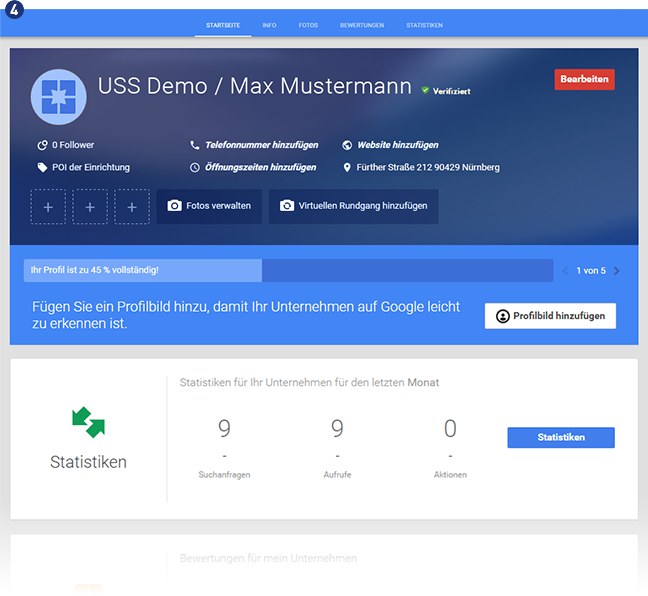
In the next step you should work on optimizing your Google My Business profile. The start screen shows a basic overview of your Google My Business profile. [4] This includes any data that you already have entered in your initial registration, as well as optional information that you should add to your account. This page serves as a dashboard: It provides key statistical figures related to search queries, customer reviews, and Google+.
GoogleMyBusiness6_de

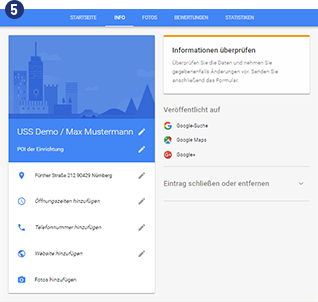
You can also edit information via the “Info” tab. [5] Here you have access to some additional information and features: You can see on which Google services your company has been published and you can close or remove your Google My Business profile.
GoogleMyBusiness7_de

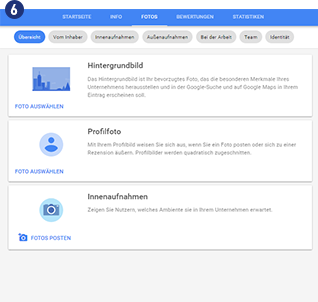
You might also want to consider using photos to present yourself and your business to potential customers. You can find this option in the “Photos” tab. [6] You can assign uploaded photos to the categories owner photos, interiour and exterior photos, photos at work, team photos and (most importantly!) identity photos. In the identity section you may specify a product image, which appears when you answer to reviews/ratings of your business. [7]
GoogleMyBusiness8_de

GoogleMyBusiness9_de


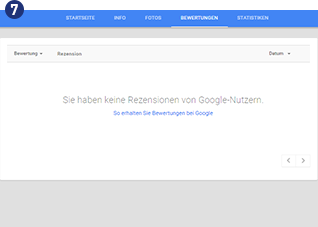
These ratings/reviews can be viewed and managed under the “Reviews” tab. [8] They list experiences customers had with your company and your products. Make sure you actively communicate with users (particularly when your receive negative reviews). Ratings and reviews have a great impact on customers’ decision making, particularly when your service isn’t greatly established yet.

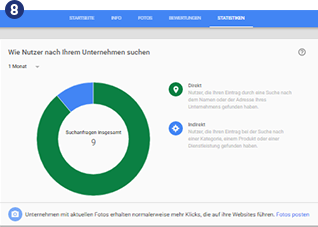
The Insights section provides data that was collected by Google in connection with your My Business entry. For example: How many users were directly looking for your company? How many were just looking for a service in your area? How many users visited your website after they saw your profile or used services such as the call option on your profile?
GoogleMyBusiness10_deGoogleMyBusiness11_de


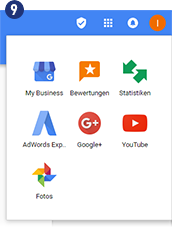
Since Google is trying to link multiple services to Google My Business, you can also access AdWords Express and Youtube service using the menu at the top right. [9]

To sum it up: Having a Google My Business profile is a “must-have” for your business. Searching for businesses locally is becoming increasingly popular. Hence, being visible amongst these search results is important and may generate a large amount of leads. Keep in mind that this Google service is free of charge for you.


How to advertise on Facebook

Advertising on social media networks lets you reach a large number of specifically targeted customer groups!

Get step-by-step instructions on how to use Facebook for your marketing purposes and boost your sales!
For example, you can also learn about the Facebook Tracking Pixel and how to effectively advertise to reach as many potential customers as possible.

You will find everything you need to know about “Advertising on Facebook” in our USS Campus